

Zero-Shot Object Detection with CLIP Models

Imagine you’re at a party, and your friend shows you a photo asking, ‘Can you spot the lychee in this picture?’ You might have never seen a lychee before, but if someone describes it as ‘a small, red fruit with a rough texture,’ you can use that information to make an educated guess. This is exactly what we want computers to do: recognize objects they’ve never been specifically trained to find by using prior knowledge from textual descriptions or related concepts. This is where Zero-Shot Object Detection comes in!
Traditional object detection systems work like rote learners. They need to see countless labeled examples: “cat,” “car,” “bottle”, before they can accurately identify objects. Imagine trying to teach a child what a spoon is by showing them hundreds of spoon photos instead of simply describing it. Not the most efficient way to learn, is it?
But what if we could create a system that learns more like humans? A system that doesn’t need to see every single example but can reason about objects from descriptions alone. That’s where CLIP (Contrastive Language-Image Pre-training), an AI model developed by OpenAI, comes into the picture. CLIP is like giving a computer both eyes to see and a brain that understands language. Let’s dive deeper into how it works, what makes it special, and how you can use it for your projects!
Understanding the Basics
What Makes CLIP Special?
Traditional computer vision models are like robots that can only recognize items from a predefined catalog. CLIP, on the other hand, is like having a smart assistant who understands both pictures and words and can connect them intelligently.
- Traditional Model: “I can only recognize cats if you’ve shown me thousands of cat pictures during training.”
- CLIP: “I understand what cats look like AND I understand what the word ‘cat’ means, so I can identify cats even in situations I haven’t seen before!”
How CLIP Connects Images and Tex
- When CLIP sees an image, it encodes it into a unique numeric representation, or embedding, that captures its essence.
- Similarly, when CLIP reads a text description, it converts that text into the same type of embedding.
These embeddings exist in a shared “space” where similar visual and textual concepts end up close to each other. For instance, a photo of a cat and the text “a cat” would be neighbors in this embedding space, enabling CLIP to make meaningful connections.
The Concept of “Zero-Shot” Learning
“Zero-shot learning” may sound technical, but it’s a simple idea. Let’s say someone tells you: “A peacock is a large bird with vibrant, colorful feathers and a fan-shaped tail.” Even if you’ve never seen one in person, you could identify a peacock in a picture using this description alone. That’s zero-shot learning, the ability to recognize something new without prior specific training.
This skill is incredibly valuable in the real world, where it’s impossible to train AI on every possible object or scenario. CLIP’s zero-shot capabilities allow it to scale effortlessly to new tasks. Let me know if you’d like me to adjust further!
Real-World Applications and Benefits
- Flexible Search Systems: Want to find “a person wearing a red hat sitting on a beach” in your photo library? CLIP can help!
- Accessibility Tools: Helping visually impaired people understand images through natural descriptions
- Creative Tools: Helping artists and designers find specific visual references based on text descriptions
The beauty of CLIP is that it’s incredibly versatile; you don’t need to retrain it for each new type of object you want to detect. It’s like having a universal translator between the visual world and human language!
How CLIP Works
Architecture Overview
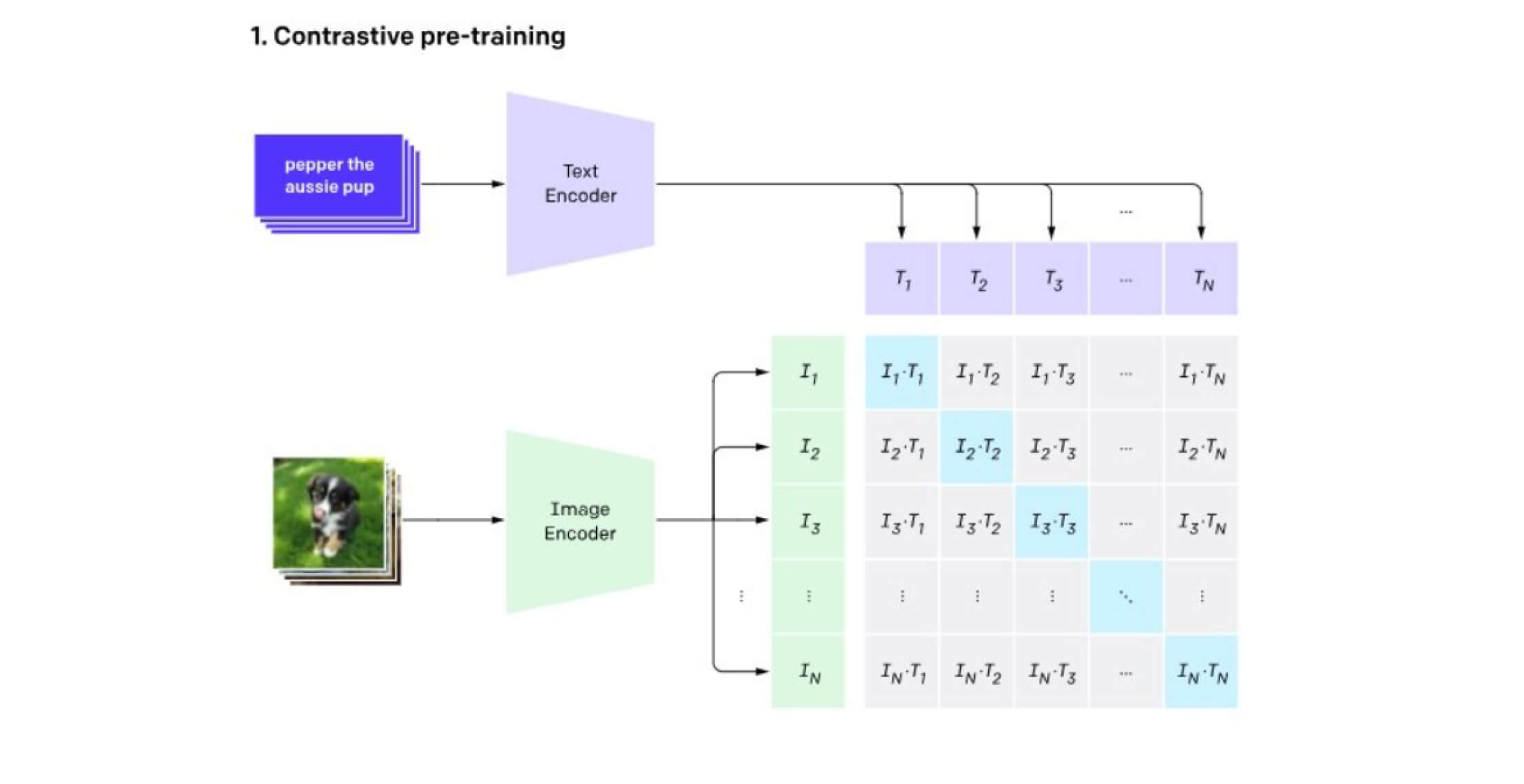
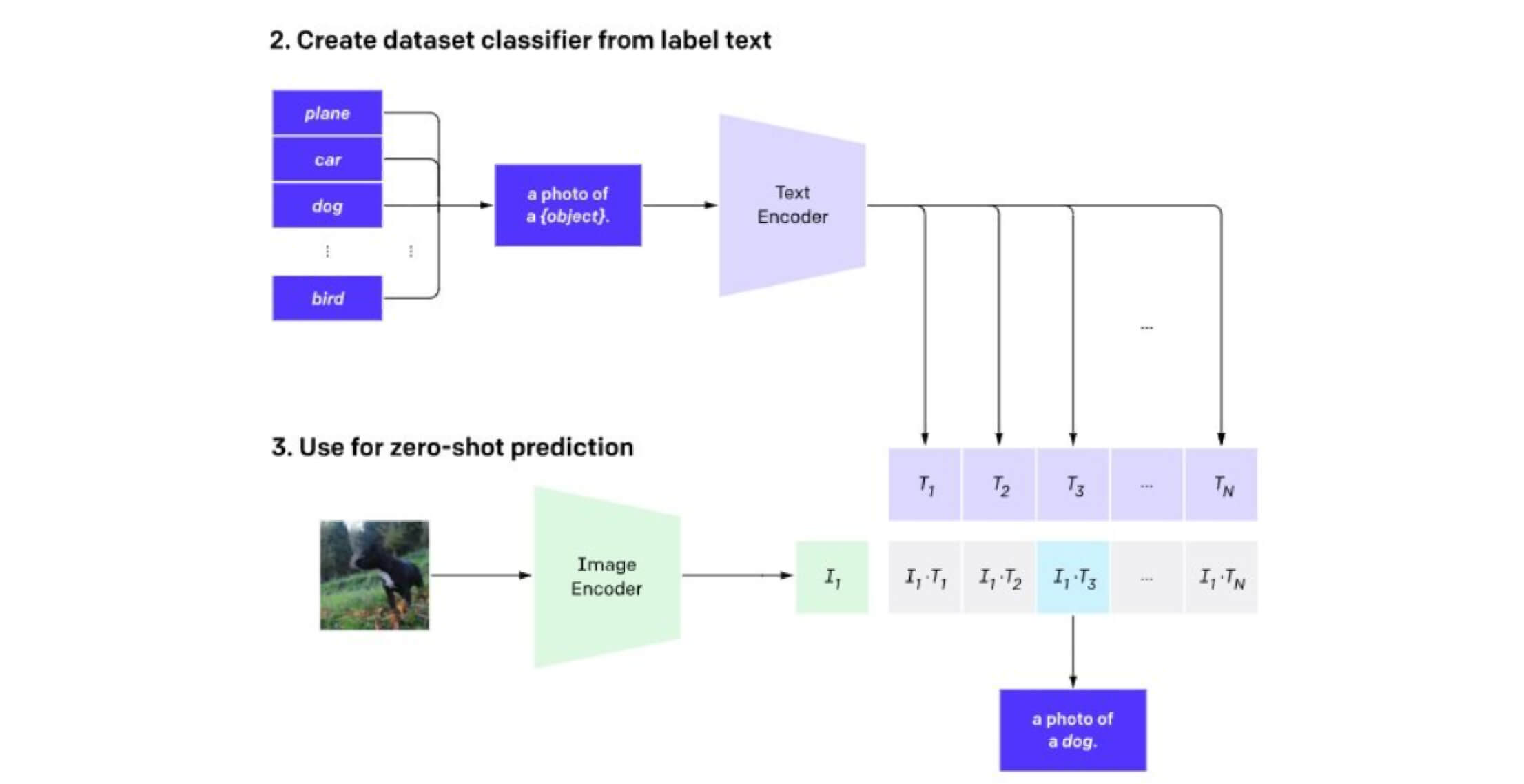
Classifier Component of CLIP
Imagine CLIP as two parallel pathways that eventually meet, like two rivers joining together:
- This is like a smart camera that takes images
- Uses a modified Vision Transformer (ViT) or ResNet
- Converts images into a standardized 512-dimensional vector (think of it as a special code)
- This is like a language expert that processes text
- Uses a Transformer architecture similar to GPT
- Converts text descriptions into the same type of 512-dimensional vector
These two pathways are trained together using contrastive learning, imagine teaching a child to match pictures with their descriptions by showing them both correct and incorrect pairs.
The Contrastive Learning Approach
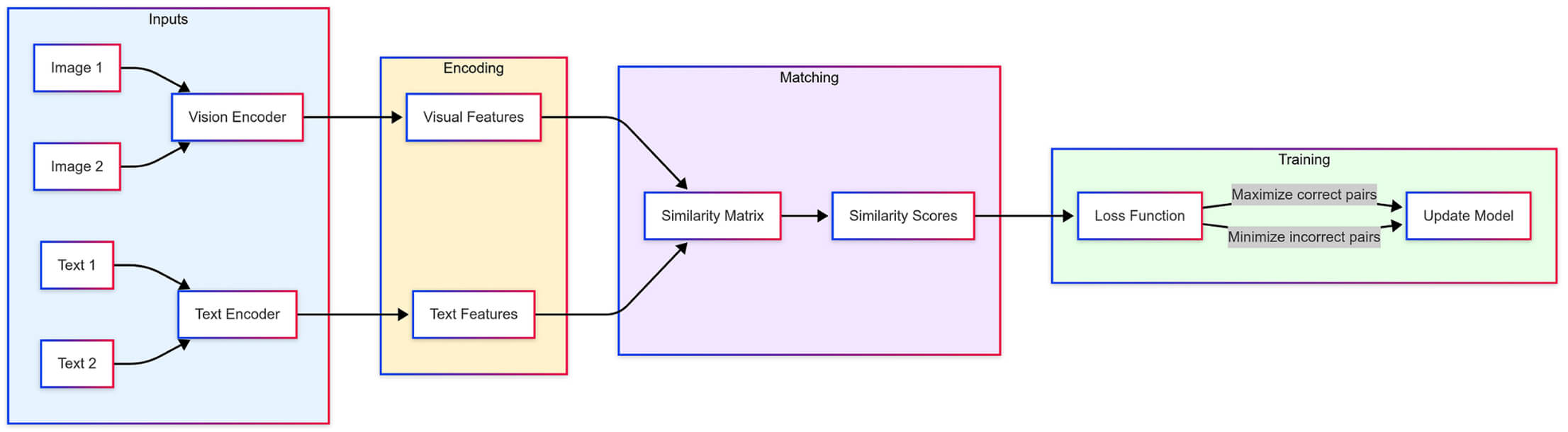
CLIP’s Training Pipeline : Converting images and text into a shared space for matching, with parallel encoders processing inputs and optimizing for correct image-text pairs through contrastive learning.
CLIP (Contrastive Language-Image Pre-training) works like a sophisticated matching game where it learns to connect images with their corresponding text descriptions. The model has two main components: a vision encoder for processing images and a text encoder for handling language, both converting their inputs into comparable mathematical representations. During training, CLIP looks at multiple image-text pairs and learns to recognize correct matches while distinguishing incorrect ones. This simple but powerful approach allows CLIP to learn from millions of image-text pairs found on the internet, helping it develop a robust understanding of how visual content relates to natural language descriptions.
Hands-on Implementation
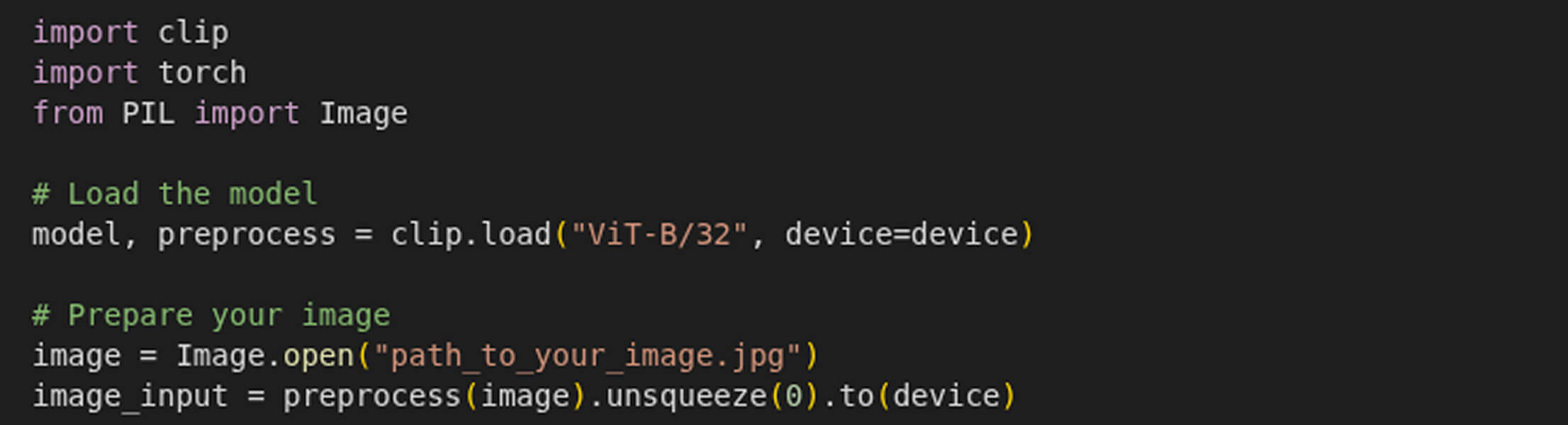
Let’s walk through a complete example of using CLIP for object detection:
Loading and Preparing CLIP
Writing Text Prompts

Processing Images and Text
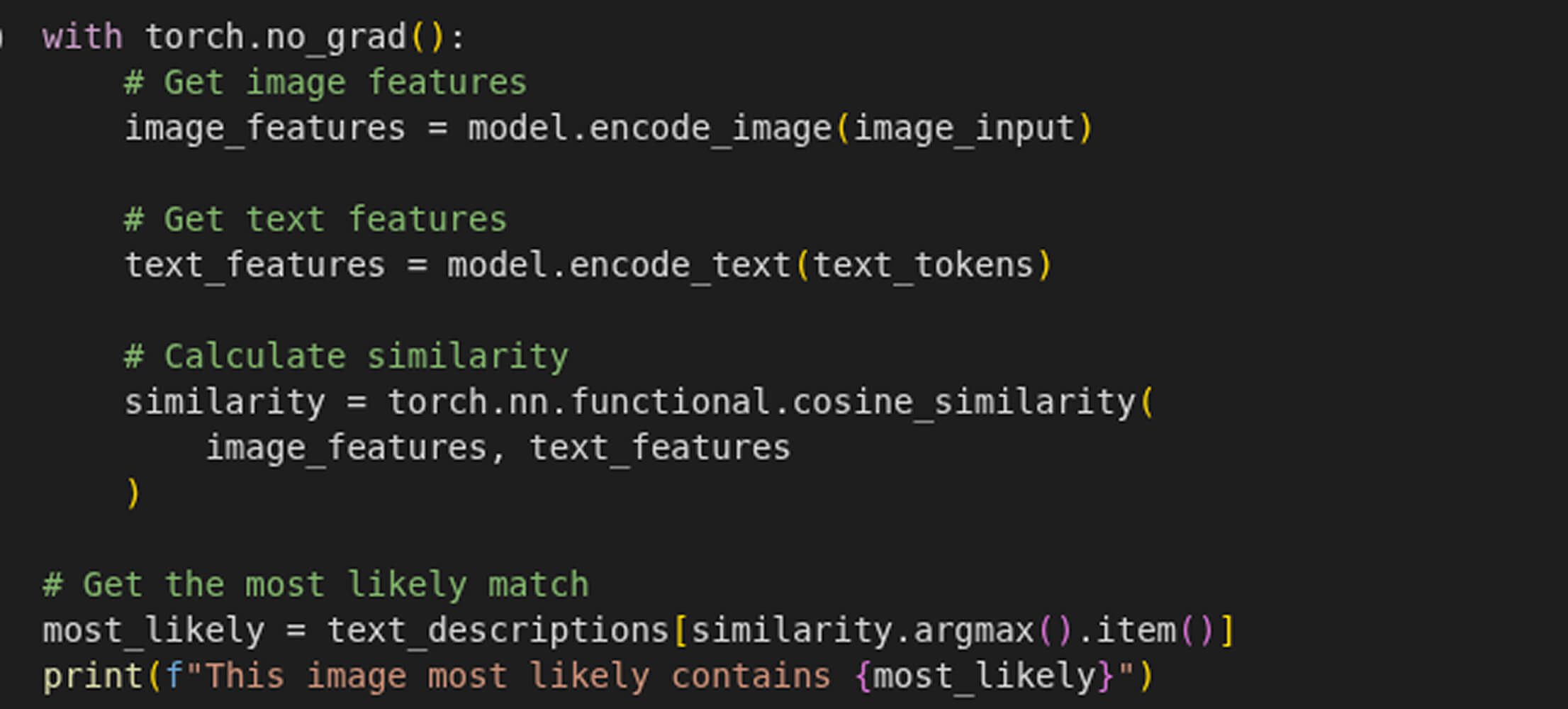
Testing CLIP with a Real-World Example
- “chocolate chip cookies”
- “cookies”
- “a cat”,
- “a dog”,
- “a cow”,
- “a person standing”
After running the code on the following image:
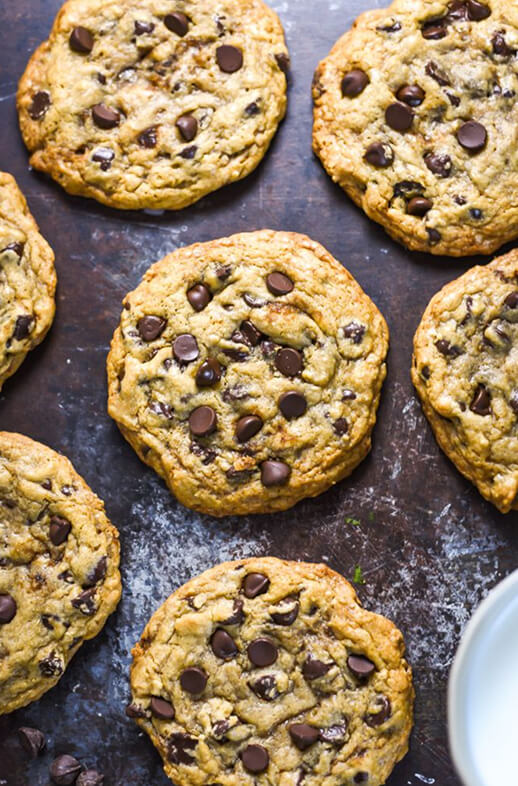
- Detected chocolate chip cookies with 31.745% confidence
As we can see, the object “chocolate chip cookies” with the highest confidence score (31.745%) is returned, which is the most specific and accurate match for the given image. This highlights how CLIP effectively aligns visual content with textual descriptions, even when given highly contextual or detailed prompts.
From Images to Videos: Detecting Objects in Motion
Imagine this: You’re watching a wildlife documentary, and you spot a rare bird. You snap a photo, wondering, “Can I find every moment this bird appears in the video?” But here’s the catch: you don’t know the bird’s name, and you can’t find any information about it online. You might think you need a name or description to search for it in the video based on the previous details in this article. But with CLIP, you don’t need any of that.
Using just the image of the bird, CLIP can scan the entire video and pinpoint every frame where the bird appears. No labels, no descriptions, just the power of AI connecting images and context.
In this section, we’ll take CLIP’s zero-shot object detection capabilities to the next level. Not only can CLIP identify objects in static images, but it can also track them across videos. Let’s dive into how you can detect an object using its image and retrieve all the frames where it appears.
Generate Embeddings for the Target Object:
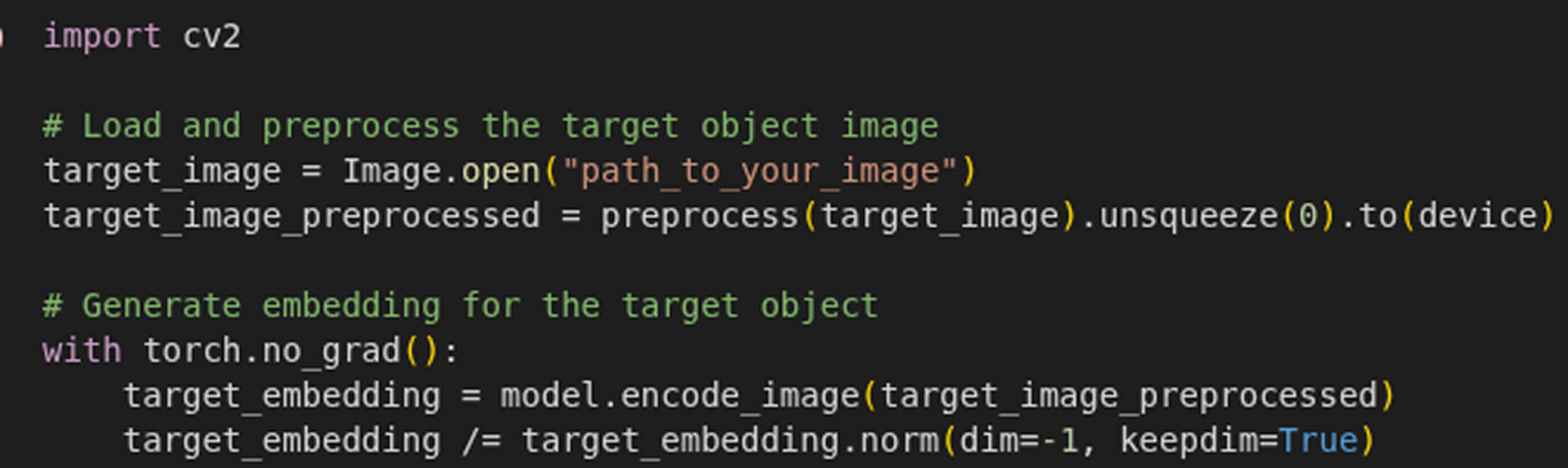
Scan Video Frames for the desired Object

Conclusion
Imagine a world where AI can recognize any object, in any image or video, without ever having seen it before. This is no longer just a futuristic dream, it’s becoming a reality with CLIP’s zero-shot object detection.
- Smarter search systems that let you find photos using natural descriptions.
- Enhanced accessibility tools that help visually impaired users understand their surroundings.
- Creative AI applications that let artists and designers retrieve inspiration through text-based queries.
- Video tracking that identifies objects across footage, even if their names are unknown.
The best part? No specialized retraining is required. Whether you’re a developer, a researcher, or an AI enthusiast, CLIP offers a powerful way to explore the connection between vision and language.
If you’re excited to try it out, check out my GitHub repository, where I’ve implemented CLIP for zero-shot object detection. Let’s push the boundaries of AI together! 🚀
GitHub Repository
Further Reading & Resources
🖥️ Official OpenAI CLIP Repository: CLIP on GitHub


